
Midjourney Prompts for High-Converting E-commerce Product Mockups: Skip the Expensive Studio Shoot
You’ve finalized the formula, approved the packaging, and the first production run is on its way. Then you get the quote from a product photographer. A single studio day often runs anywhere from $500 to $5,000, plus styling, props, retouching, and usage fees. Want lifestyle shots in a sunlit kitchen, a marble bathroom, and an outdoor setting? That usually means more locations, more days, and a bigger invoice.
For a new product that hasn’t sold a single unit yet, that spend is hard to justify. For brands launching several SKUs a quarter, it can drain the marketing budget before ads even go live.
This guide gives you a production-ready Midjourney master prompt built for one job: producing premium, conversion-focused product mockups for your store, ads, landing pages, and social feeds. You can use it to test creative concepts before a launch, produce dozens of lifestyle variations in an afternoon, and save your photography budget for the shots that truly need a camera.
Why This Prompt Works
Most people get mediocre product images from Midjourney because they type something vague like “a bottle of face serum on a table.” Midjourney fills the gaps with random choices, and the result looks like generic AI art instead of a product ad. This master prompt removes the guesswork by mirroring how a real commercial photographer plans a shoot:
- Reference image first: The prompt starts with your actual product image so Midjourney anchors the shape, colors, and packaging to something real instead of inventing a product.
- Commercial photography framing: Phrases like “high-end commercial product photography” and “advertising campaign” push the output toward polished catalog quality.
- A defined shot list: Specifying the angle, surface, and setting gives you control over composition, the same way an art director would.
- Deliberate lighting language: Lighting is what separates premium from amateur. Terms like “softbox key light” and “rim light” produce the controlled, glossy look shoppers associate with trusted brands.
- Camera and lens cues: Naming a lens and aperture tells Midjourney how much background blur to use and how much distortion to avoid.
- Built-in conversion thinking: The prompt reserves negative space for ad copy and keeps the focus on the product. Those two things matter for ads and hero banners.
- Parameter control: –style raw reduces Midjourney’s default artistic styling for a more photographic result. –no removes common problems like clutter, extra products, and warped text.
The Master Prompt
Copy this template, replace each bracketed variable with your own details, and paste it into Midjourney (Discord or the web app). Uploading your product photo and placing its URL at the very start is strongly recommended.
[PRODUCT IMAGE URL] high-end commercial product photography of [PRODUCT DESCRIPTION: item type, material, color, finish, packaging details], [SHOT TYPE AND ANGLE], placed on [SURFACE OR PROP], in [SETTING OR BACKGROUND], [LIGHTING SETUP], [MOOD AND BRAND AESTHETIC], color palette of [BRAND COLORS], styled with [SUPPORTING PROPS], shot on a full-frame camera with [LENS AND APERTURE], [DEPTH OF FIELD], tack-sharp focus on the product, crisp clean packaging, realistic reflections and soft natural shadows, premium advertising campaign aesthetic, uncluttered composition with clean negative space on the [LEFT / RIGHT / TOP] for ad copy --ar [ASPECT RATIO] --style raw --s [STYLIZE VALUE 50-250] --v 7 --no [UNWANTED ELEMENTS]Example 1: Amazon-Style Hero Image (Clean White Background)
[PRODUCT IMAGE URL] high-end commercial product photography of a frosted amber glass serum bottle with a matte black dropper cap and minimalist white label, straight-on eye-level front view, standing on a seamless pure white background, soft even studio lighting with two large softboxes and a subtle reflection beneath the bottle, clean clinical luxury skincare aesthetic, shot on a full-frame camera with a 100mm macro lens at f/8, entire product in sharp focus, crisp clean packaging, realistic soft contact shadow, premium e-commerce catalog aesthetic, centered composition --ar 1:1 --style raw --s 50 --v 7 --no props, text overlay, extra bottles, gradient, clutterExample 2: Lifestyle Mockup for Instagram and Facebook Ads
[PRODUCT IMAGE URL] high-end commercial product photography of a frosted amber glass serum bottle with a matte black dropper cap, three-quarter angle slightly above eye level, placed on a travertine stone vanity tray, in a bright minimalist bathroom with blurred eucalyptus and a linen towel in the background, warm morning sunlight streaming through a window creating soft dappled shadows, calm spa-like clean beauty aesthetic, color palette of warm beige, sage green and soft white, styled with a few water droplets and a small sprig of eucalyptus, shot on a full-frame camera with an 85mm lens at f/2.8, shallow depth of field with creamy background bokeh, tack-sharp focus on the product, realistic reflections, premium advertising campaign aesthetic, clean negative space on the right for ad copy --ar 4:5 --style raw --s 150 --v 7 --no people, hands, extra bottles, cluttered background, distorted textExample 3: Flat Lay for a Landing Page Banner
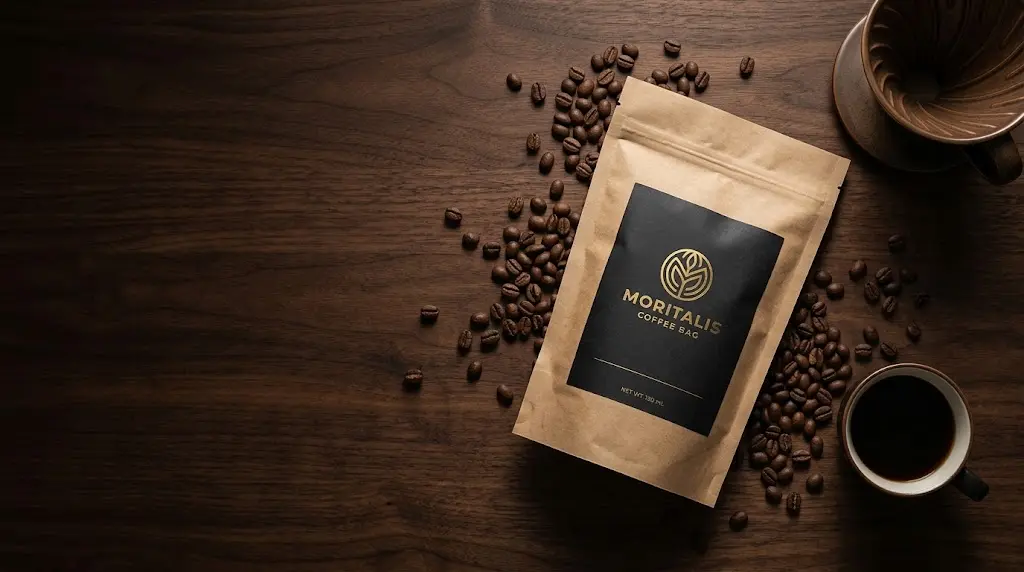
[PRODUCT IMAGE URL] high-end commercial product photography of a recycled kraft paper coffee bag with a matte black label and gold foil logo, top-down flat lay view, placed on a dark walnut wood surface, surrounded by scattered roasted coffee beans, a ceramic pour-over dripper and a small cup of black coffee, moody directional side lighting with deep soft shadows, artisanal specialty coffee brand aesthetic, color palette of deep brown, black and warm gold, shot on a full-frame camera with a 50mm lens at f/5.6, even focus across the scene, tack-sharp focus on the bag, premium advertising campaign aesthetic, wide clean negative space on the left for headline text --ar 16:9 --style raw --s 200 --v 7 --no people, extra bags, messy spills, distorted logoHow to Customize and Use It
Each variable controls one part of the “virtual shoot.” Here’s how to fill them in for the best results:
Prompt Variables Explained
- [PRODUCT IMAGE URL]: Upload a clear, well-lit photo of your real product (even a smartphone photo on a plain background works) and paste its link at the start of the prompt. In Midjourney V7 you can also use the Omni Reference feature (–oref with an image URL, adjusted with –ow) to keep the product consistent across scenes. Check Midjourney’s current documentation, because reference features change between versions.
- [PRODUCT DESCRIPTION]: Be specific. Instead of “a bottle,” write “a frosted amber glass bottle with a matte black dropper cap.” Material, finish, and color words do much of the work.
- [SHOT TYPE AND ANGLE]: